Your browser could not start Mavowow

Update your browser, then reload this page. Mavowow supports Chrome and Edge 85 or later, Firefox 79 or later, and Safari and iOS Safari 14 or later.

Reload Mavowow

Mavowow did not finish loading

Check your network connection and reload this page. If the problem continues, clear your browser cache and try again.

Reload Mavowow

MavowowMavowow
HomeWorkspace
AI Ecommerce

Ecommerce tools

  • Product suiteTurn one product image into a complete listing suite
  • A+ contentTurn product benefits into detail-page modules
  • SKU batchCreate consistent SKU color and background variants
  • AI Product Photo Composition ReferenceCreate a product visual from a composition reference
  • Product retouchRefine product materials, lighting and clarity
  • Product recolorSpecify the target area and color for SKU variants
  • AI Product Background ChangerCreate a new product background from text or a reference
  • Outfit image setCreate white-background, dimensional, mannequin and campaign apparel sets
  • AI Fashion Model Photos from Clothing ImagesTurn a garment image into an on-model visual
  • AI Accessory Try-onTurn an accessory image into a natural on-model visual
  • Model pose changeChange a model pose with smart, text or reference controls
  • AI model face swapKeep the styling and scene while replacing the model face
  • AI shoe try-onTurn a shoe image into a focused try-on visual
Generation tasksPricing
API
Product updates
  • Oct 9NewNano Banana 2.1 is here, with a limited-time 50% discountWant to explore a new image or give an existing one a fresh look? Nano Banana 2.1 is now available for image generation and editing, with output up to 4K and a limited-time 50% discount.
  • Oct 712 new AI E-commerce tools for product photos and virtual try-onBuilding on the existing Product Suite, Mavowow now offers 12 more AI E-commerce tools for A+ Content, SKU images, product retouching, background replacement, apparel visuals, and virtual try-on. There are now 13 tools covering everyday e-commerce image creation.
View all updates
  • English
  • 中文
MavowowMavowow
APIChangelogHomeWorkspace
AI Ecommerce
  • Product suiteTurn one product image into a complete listing suite
  • A+ contentTurn product benefits into detail-page modules
  • SKU batchCreate consistent SKU color and background variants
  • AI Product Photo Composition ReferenceCreate a product visual from a composition reference
  • Product retouchRefine product materials, lighting and clarity
  • Product recolorSpecify the target area and color for SKU variants
  • AI Product Background ChangerCreate a new product background from text or a reference
  • Outfit image setCreate white-background, dimensional, mannequin and campaign apparel sets
  • AI Fashion Model Photos from Clothing ImagesTurn a garment image into an on-model visual
  • AI Accessory Try-onTurn an accessory image into a natural on-model visual
  • Model pose changeChange a model pose with smart, text or reference controls
  • AI model face swapKeep the styling and scene while replacing the model face
  • AI shoe try-onTurn a shoe image into a focused try-on visual
Generation tasksPricing
  • English
  • 中文
  1. AI Ecommerce
  2. /Ecommerce tool
    • Product suite
    • A+ content
    • SKU batch
    • AI Product Photo Composition Reference
    • Product retouch
    • Product recolor
    • AI Product Background Changer
    • Outfit image set
    • AI Fashion Model Photos from Clothing Images
    • AI Accessory Try-on
    • Model pose change
    • AI model face swap
    • AI shoe try-on

AI model face swap

Examples illustrate creative directions. Review product details, text and source rights before listing. Try-on visuals do not establish physical fit.

01

Upload images

Upload a full model image and a clear face reference

Model imageRequired; preserves styling, pose, hair, and scene
Face referenceRequired; used only for identity and facial features
02

Generation settings

Set the aspect ratio, naturalness, and usage permission

Output ratio

Add makeup or naturalness preferences; no complex prompt is needed

0 / 200
Usage permission
Cost—

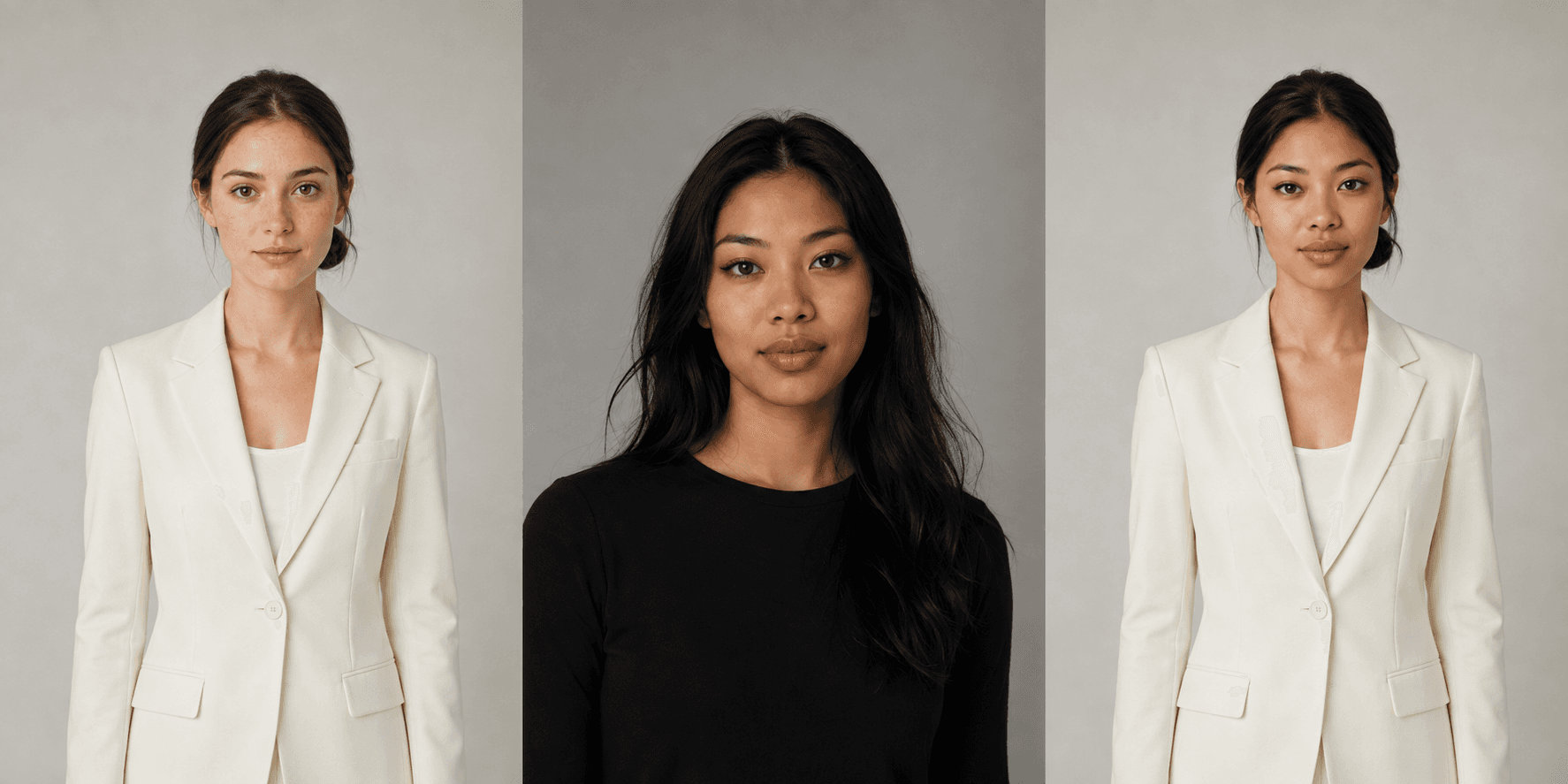
Workwear face swap

  1. Original female model, face reference, and face-swapped result preserving the model's outfit and pose: original model
    Model
    →
  2. Original female model, face reference, and face-swapped result preserving the model's outfit and pose: face reference
    Face reference
    →
  3. Original female model, face reference, and face-swapped result preserving the model's outfit and pose: face-swapped result
    Result

Recent results

Loading recent results
FAQ

Frequently asked questions

Upload an existing model image and a face reference to create a replacement while aiming to retain the original clothing, pose and scene. If you only have a garment photo and need a model presentation, use Fashion Model Photos instead. Check collars, accessories and product logos for unintended edits after face replacement.

Upload one complete model image and one clear face reference. The model image provides the product, outfit, pose and environment; the face reference provides the intended facial features. Keep their roles distinct and avoid cropping important clothing or products out of the model image.

Choose a clear, minimally obstructed face with little retouching and appropriate usage permission. A selfie should meet the same conditions. Match the original model's face direction where possible; a profile image needs relevant side-view features. Filters, hair covering features and exaggerated expressions make transitions harder to review.

The workflow aims to retain the original styling and setting. Emphasize the required hairstyle, makeup and lighting in the optional notes, such as retaining natural makeup and matching the scene's light direction. Generative editing can still affect those areas, so compare the output with the original rather than treating preservation instructions as a guarantee.

You can apply the same face reference to each model image separately to work toward a consistent series. The current page accepts one model image and one face reference per submission, rather than replacing a whole series in one batch. Different angles, expressions and lighting can produce variation, so compare and select results across the series.

Check angle and lighting differences between the two sources, and consider a closer matching face reference. Add instructions for natural skin transitions and the original light direction. Inspect the hairline, ears, jaw and neck, along with whether facial sharpness matches the body, rather than judging facial resemblance alone.

It can. Although the intended edit is facial, nearby collars, earrings, hats or logos may change. Compare those areas with the original at full size. For listing assets, product identity and detail accuracy matter alongside a natural-looking face.

Use material only when you have the relevant likeness and image permissions for the intended purpose. A downloadable photo is not permission to advertise with it. The current form requires confirmation of face-reference permission before submission. Unauthorized likenesses should not be used commercially, and generated images do not establish a real shoot or endorsement.